SHM Staking on Sikka.fun: Stake, Claim, and Use Rewards
Learn how to stake SHM through Sikka.fun, support the Shardeum network, claim protocol-based rewards, and use them across the...
Learn how to stake SHM through Sikka.fun, support the Shardeum network, claim protocol-based rewards, and use them across the...
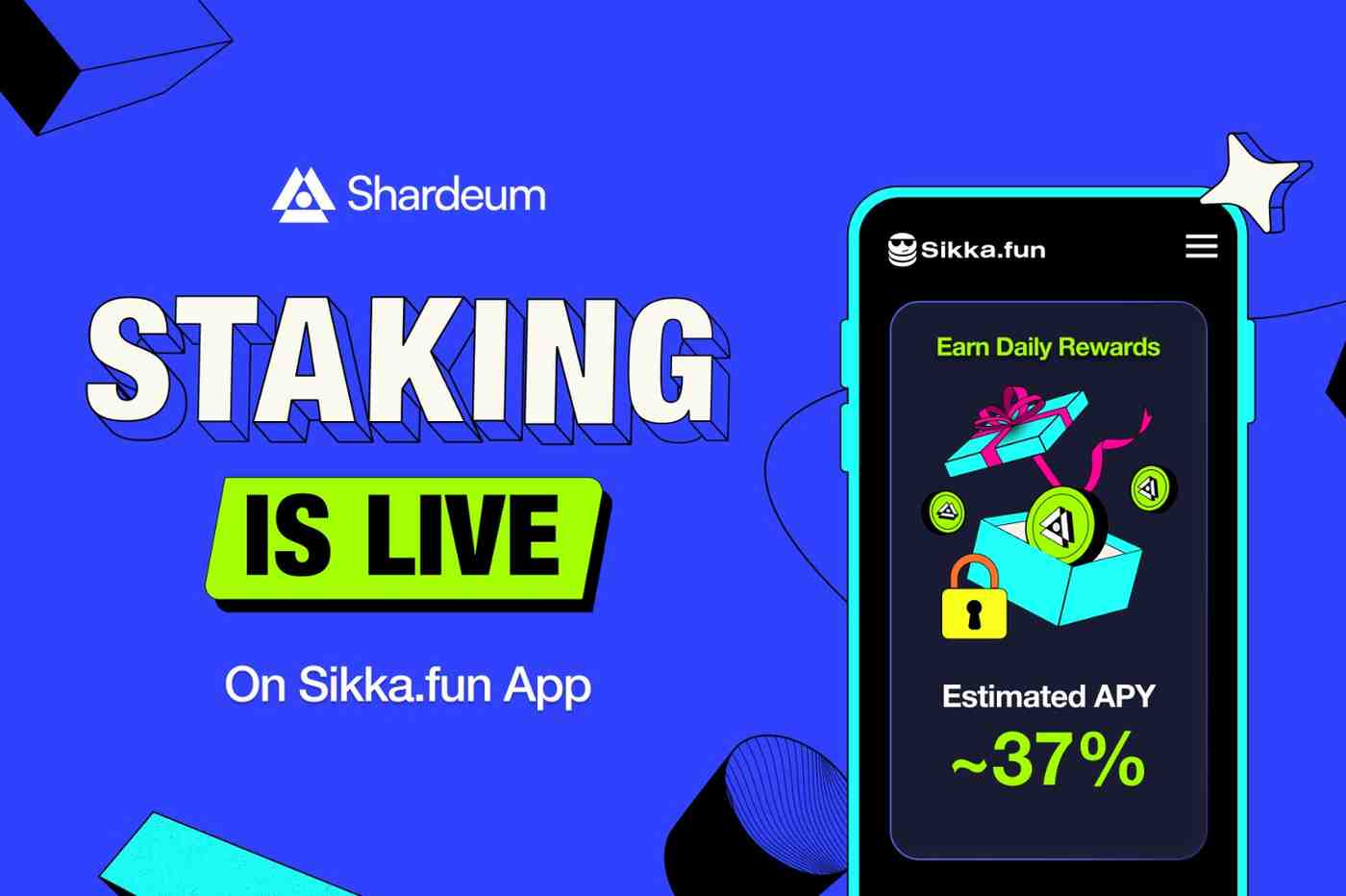
Sikka.fun is introducing the ‘Stake & Earn’ Program, making it easier for users to stake SHM directly in the app, support Shardeum’s network security and decentralization, receive protocol-based rewards, and use claimed rewards across Sikka.fun activities.
The current estimated APY is approximately 37%. Staking rewards are distributed daily and may vary based on network conditions and protocol parameters.
The basic flow in the Sikka Stake & Earn program is simple:
✅ Stake SHM → Earn Daily Rewards → Claim Rewards → Trade Your Favorite Memecoins
In other words, users can:
Need SHM to get started? You can obtain SHM through supported exchanges
For instance, if a user stakes 1,000,000 SHM at the current estimated APY of 37%,
Once staking rewards are claimed, they are added to your Sikka.fun SHM balance. You can then use them across the app, including:
This gives users another way to stay active on Sikka.fun. Rather than relying solely on their available SHM balance, users can claim protocol-based rewards and choose how to use them across the app.
SHM staking on Sikka.fun is designed to bring staking and everyday app activity together.
Instead of managing staking separately, users can stake SHM, track rewards, claim them into their Sikka.fun balance, and use them across the app – from trading community coins to participating in campaigns – all from a single mobile experience.
Of course, users who want a validator-level staking experience can use Shardeum’s official staking dashboard by connecting their EVM wallet.
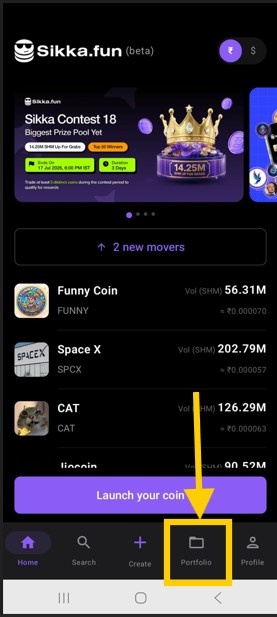
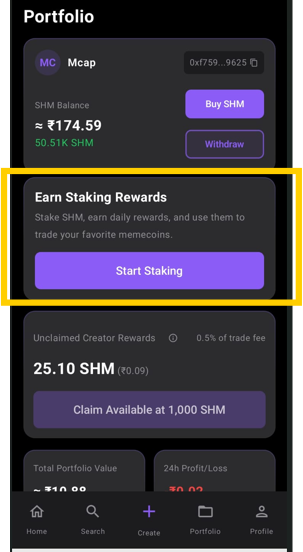
1. Open the Sikka.fun Android app and tap Portfolio at the bottom of the screen. In the following screen, go to the staking section from your portfolio – Earn Staking Rewards, and tap on Start Staking button
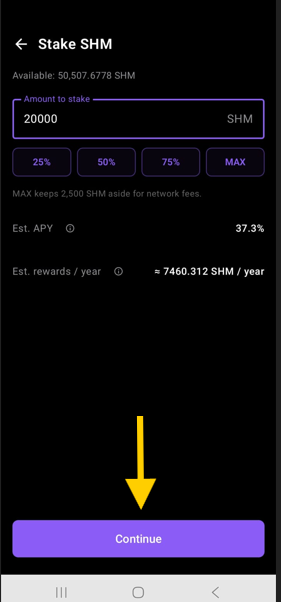
2. Enter the amount of SHM you want to stake. In this example, we’ll stake 20,000 SHM and tap Continue. (Tip: Keep a buffer of around 2500 SHM in your wallet to cover gas fees for staking, unstaking, claiming rewards, and other on-chain actions.)
After tapping Continue, you’ll see a confirmation pop-up. Review the estimated annual rewards and network fee, then tap Confirm & Sign to approve your staking transaction.
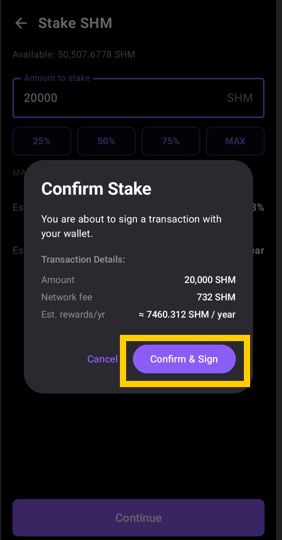
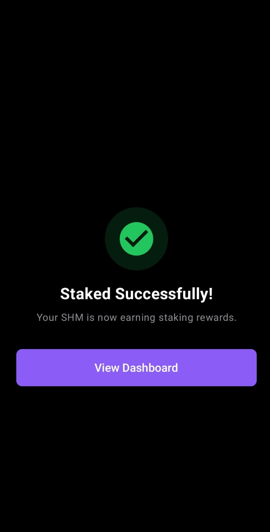
3. Once staking is complete, you’ll see a “Staked Successfully” confirmation. Your SHM is now earning protocol-based staking rewards.
You can now proceed and tap View Dashboard to return to the staking section in your portfolio. From there, you can track your staked SHM, monitor accumulated rewards, and manage your staking activity at any time.
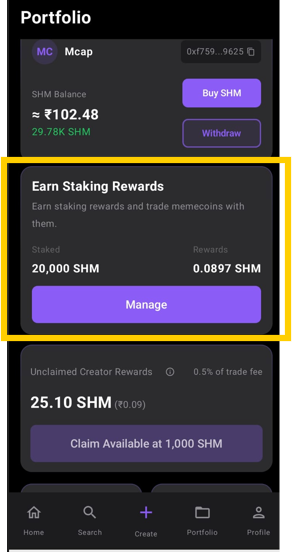
4. Next, tap Manage to claim staking rewards, add more SHM to your stake, or to unstake your SHM.
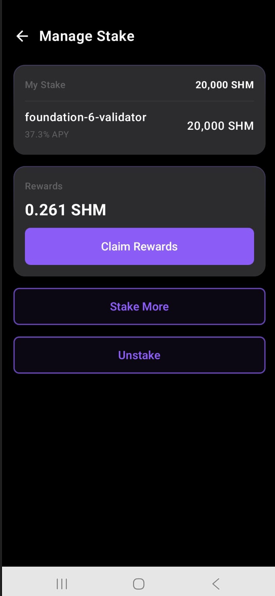
Staking rewards are distributed daily and accumulate over time.
Users can claim accumulated rewards into their Sikka.fun SHM balance. Once claimed, rewards can be used across Sikka.fun activities.
You will also find two more buttons below ‘Claim Rewards’ button. You can tap Stake More to increase the amount of SHM earning the staking rewards or Unstake to begin the unstaking process, as needed.
Note: Unstaking has a 21-day unbonding period. During this time, your SHM remains locked and does not receive rewards. Once the period ends, the unstaked SHM is credited back to your Sikka.fun account. Please plan unstaking based on when you may need access to your SHM.
Sikka.fun crosses $100K in trading volume on Shardeum, with 18.4K+ users, 3.5K+ coins created, 800+ referrers, and 2.9B+ SHM...
WazirX users can claim 25,000 SHM on Sikka.fun (Phase 3). Limited to 1000 users holding 5000+ WRX. Create and trade coins in...
WazirX users can claim 50,000 SHM on Sikka.fun. Limited to the first 1,000 users. Get started with coin creation and trading in...